Move-in and move-out inspection
Your rental home, room by room, on record
Roomtrail makes a move-in report of your rental home in about 15 minutes. Photos with date and time, an arrow or circle on every scratch, meter readings, keys and both signatures on the screen. Then a clear PDF that you send to your landlord and to yourself the same day. No account, no ads, no internet.
Coming soon on Google Play, for Android.
How it works
Walk through, tap, take photos, sign
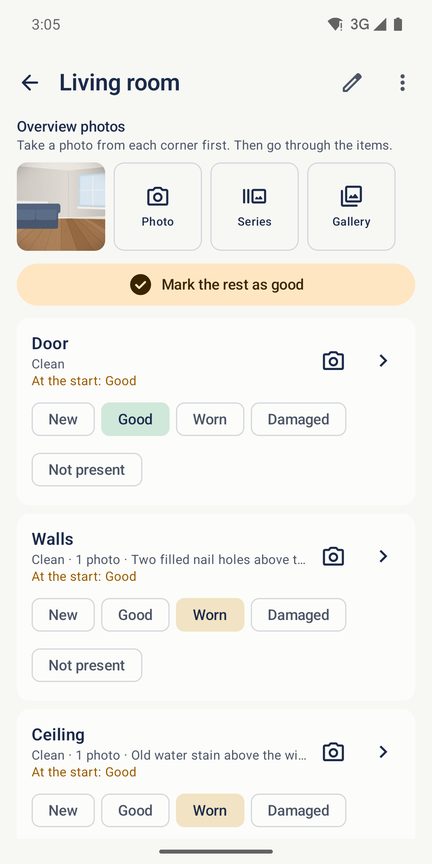
On the day you get the keys, you want to unpack, not fill in forms. Roomtrail gives you a ready list for every room, so you only look and tap.
Choose the type of home
Apartment, house, student room, holiday home or rental car. Roomtrail fills in the rooms and the items to check, from walls and floor to oven, shower and grout. Add, rename or remove whatever you like; nothing is mandatory.
Walk from room to room
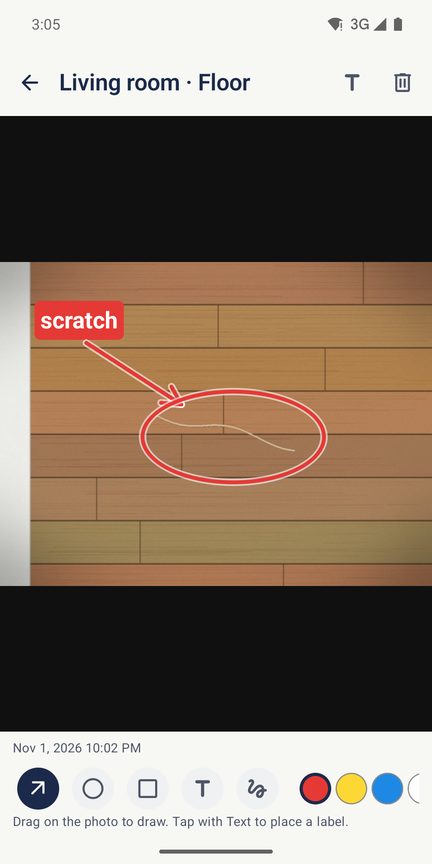
Tap New, Good, Worn, Damaged or Not present. Take photos with the camera app of your phone, with wide angle and flash, and draw an arrow or circle on what you mean. Everything that is fine at once: "mark the rest as good".
Sign and send
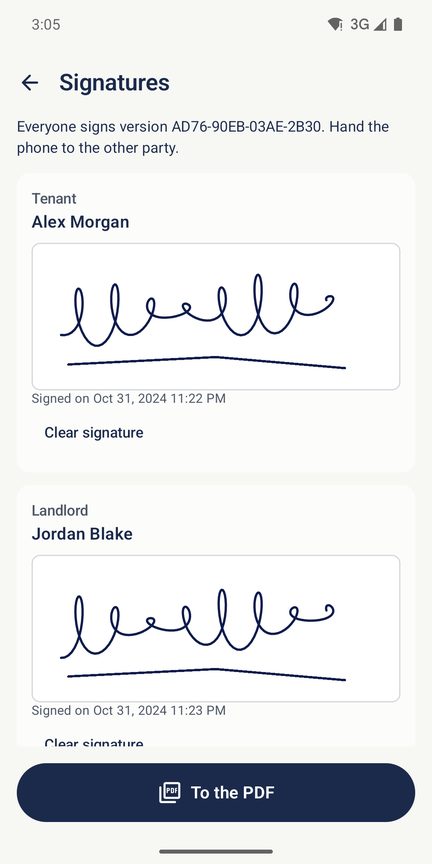
Write down the meters and count the keys. Tenant and landlord sign with a finger on the screen. Roomtrail makes a PDF that you send to both of you right away, by email or chat.
The report
A PDF that someone else can read in five minutes
A report is only useful if the other party reads it. That is why the PDF starts with a summary and keeps every room on one table.
- Cover page with the address, the date, the people present and a summary: how many items are worn or damaged, and what is missing.
- A table per room with the condition in colour, the cleanliness and your notes.
- Numbered photos with date and time, and your arrows and circles. Photos from the gallery keep their own date and are marked as such.
- Meters and keys: electricity, gas, water and heat, or mileage and fuel for a car, each with a photo. Every key and card counted.
- Signatures of tenant, landlord, agent or witness. Someone does not want to sign? That is recorded too, with the reason.
- A4 or Letter, small enough for email or sharp for printing.
- In 21 languages. The report can be in another language than the app, for example in the language of your landlord.
Every finished report gets a short code. Change anything, and the code changes too, so both of you can see that you have the same version.
Move-out
At move-out, the same list again
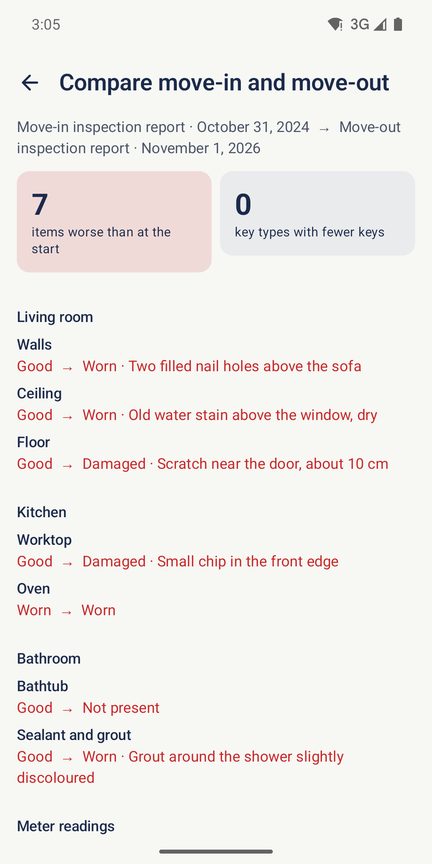
Years later, when you hand back the keys, the move-in report is still on your phone. The move-out report starts with the same rooms and items. While you walk through it, you see what was written at move-in, with the photos.
With the full version, the comparison report puts start and end side by side: what got worse, which keys are missing, how far the meters went, and the photos of before and after next to each other. Then you talk about facts, not about memories.
What Roomtrail does not do
Roomtrail records what you see, with the date and time of your phone. It does not give legal advice and does not decide who pays for what. What a report means for your deposit depends on your contract and the law where you live.
For everyone
For tenants, landlords and holidays
Tenants use Roomtrail to show what was already there on day one. Small landlords use it to hand over a home with a clear report, and to do the same check when the tenant leaves.
A holiday home or a rental car works the same way: a short list, a few photos, and you know what it looked like when you arrived.
A new phone
A lease lasts years, your report too
The move-in report has to exist on the day you move out, also when you have a new phone by then. Android backup keeps your reports and small versions of your photos in your own Google account. The backup file holds everything, including full size photos: save it somewhere safe, open it on the new phone, and every report is back. And the PDF you sent is yours anyway.
Price
Free for your own home, one payment for more
One home with all its reports is free, for as long as you like. That is enough for most tenants. Landlords with more homes, and anyone who wants the comparison report, unlock the full version once in Google Play. No subscription and no ads, now or later.
Free
€0
For as long as you like, without ads
- One home with move-in, move-out and interim reports
- Unlimited rooms and photos, drawing on photos
- Meters, keys and signatures
- The PDF in any of the 21 languages
- Android backup and the backup file with all photos
Full version
€2.99
One payment, no subscription
- Unlimited homes and cars
- Comparison report of move-in and move-out, with photos side by side
- Reports in two languages at once
- Your own rooms as templates
- Updates included
What you have recorded never gets locked: you can always open, share and export every report. Prices include VAT, so they differ a little per country: €2.99 in the Netherlands, France, Italy and Spain, €2.89 in Germany, US$2.79 in the United States and £2.49 in the United Kingdom. Google Play shows you the exact price in your own currency before you buy. The unlock is linked to your Google account, so it also works on a new phone.
Privacy
Your home is nobody else's business
Photos of every room, your address and your signature are about as private as it gets. That is why they never leave your phone unless you send them yourself.
No internet access
The app has no permission to use the internet. Android does not let it go online, so nothing can be sent to us or to anyone else.
Nothing collected
No account, no ads, no analytics, no tracking. We have no server for your reports and cannot see them.
Your own camera app
Roomtrail does not ask for the camera permission at all. Photos are taken with the camera app of your phone, and only the photos you take go into the report.
You decide who gets it
The PDF and the backup file go only where you send them. Android backup goes to your own Google account. Read more in the privacy policy.
Questions
Frequently asked questions
Does Roomtrail need an internet connection?
No. The app has no permission to use the internet at all. Walking through the home, taking photos, signing and making the PDF all work offline, also in a new home where the internet is not connected yet. Only the purchase of the full version goes through Google Play.
Will a report get your deposit back?
We cannot promise that, and nobody honestly can. Roomtrail gives you a clear, dated record of what the home looked like, signed by both of you if you like. What that means in a dispute depends on your contract and the law where you live. Roomtrail does not give legal advice.
Where do the date and time come from?
From your phone, at the moment you take a photo or sign. Photos you add from the gallery keep their own date and are marked "from the gallery" in the report. The code on a finished report changes when anything changes, so both of you can see you have the same version. It is a code, not a seal: Roomtrail does not claim a report cannot be altered.
Can the landlord sign on your phone?
Yes. Hand over the phone, and tenant, landlord, agent or witness each sign with a finger. Is someone not there, or does not want to sign? Roomtrail records that, with the reason, and you send the PDF afterwards.
Your landlord speaks another language. Now what?
Choose the language of the report separately from the language of the app, in any of the 21 languages. With the full version, the report can also be in two languages at once, so you both read it in your own.
What happens when you get a new phone?
Android backup restores your reports and small versions of your photos from your own Google account. The backup file holds everything, including full size photos: save it before you switch and open it on the new phone. When you move with a cable or directly from the old phone, Android copies everything. The full version comes back through your Google account.
Can you use photos you already took?
Yes. Add them from the gallery; the report shows that they come from the gallery and with which date. Android shows its own photo picker, so Roomtrail only sees the photos you choose.
Is it only for apartments?
No. There are ready lists for an apartment, a house, a student room, a holiday home and a rental car, and you can change every list. With the full version you save your own rooms as templates for the next time.
Which phones does it work on?
Roomtrail is for Android phones with Android 8 or later. Taking photos needs a camera app; without one you can still add photos from the gallery.